> ## Documentation Index
> Fetch the complete documentation index at: https://docs.formabledocs.com/llms.txt
> Use this file to discover all available pages before exploring further.
# Non-embedded signing
> Send a document for signature by email. Formable delivers the signing link.
Send a document for signature without embedding Formable in your product.
You create a regular signature request with one or more signers, and Formable emails each person a signing link.
Use this flow when signers should complete the document in their browser from an email.
Prefer signing inside your product? See [Embedded signing](/walkthroughs/embedded-signing) instead.
## Prerequisites
Before you begin:
1. Create an organization and [API key](/authentication) in [Settings](https://app.formabledocs.com/settings).
2. Upload a template and place at least one signature field — see the [Embedded templates walkthrough](/walkthroughs/embedded-templates).
3. Call the Formable API from your **backend** only. Never expose your API key in the browser.
## Overview
Start a request from a template with one or more signers. Formable emails each signer automatically.
The signer opens the link from email and fills required fields on Formable.
Listen for webhooks or poll status, then fetch the signed PDF.
## Create a regular signature request
Call this from your backend when you're ready to send. A regular signature request needs:
* `templateId` — which document to send
* `signers` — who will sign (`email` + `name`), in signing order
Unlike [embedded signature requests](/api-reference/endpoint/create-signature-request), you do **not** generate a signing URL. Formable creates the shares and emails each signer for you. See [Create a regular signature request](/api-reference/endpoint/create-regular-signature-request).
```bash theme={null}
curl --request POST \
--url https://api.formabledocs.com/v1/signature-requests \
--header "Authorization: Bearer $TOKEN" \
--header 'Content-Type: application/json' \
--data '{
"templateId": "abc123xyz",
"signers": [
{ "email": "jane@example.com", "name": "Jane Doe", "role": "Client" },
{ "email": "bob@example.com", "name": "Bob Smith", "role": "Witness" }
],
"testMode": true
}'
```
```json Response theme={null}
{
"signatureRequestId": "sr_456def",
"templateId": "abc123xyz",
"signers": [
{
"email": "jane@example.com",
"name": "Jane Doe",
"recipientSignatureId": "rsig_jane123"
},
{
"email": "bob@example.com",
"name": "Bob Smith",
"recipientSignatureId": "rsig_bob456"
}
],
"sender": {
"email": "owner@example.com",
"name": "Org Owner"
},
"status": "Created",
"testMode": true
}
```
Save the `signatureRequestId`. You'll use it to track progress and download the signed PDF.
Each signer receives an email with a link to `/sign/{envelopeShareId}` — the same style of link used when you share from the Formable app.
### Test mode
Set `testMode: true` while integrating so the request doesn't count toward billing. Test mode documents are watermarked and are not legally binding.
## Signing experience
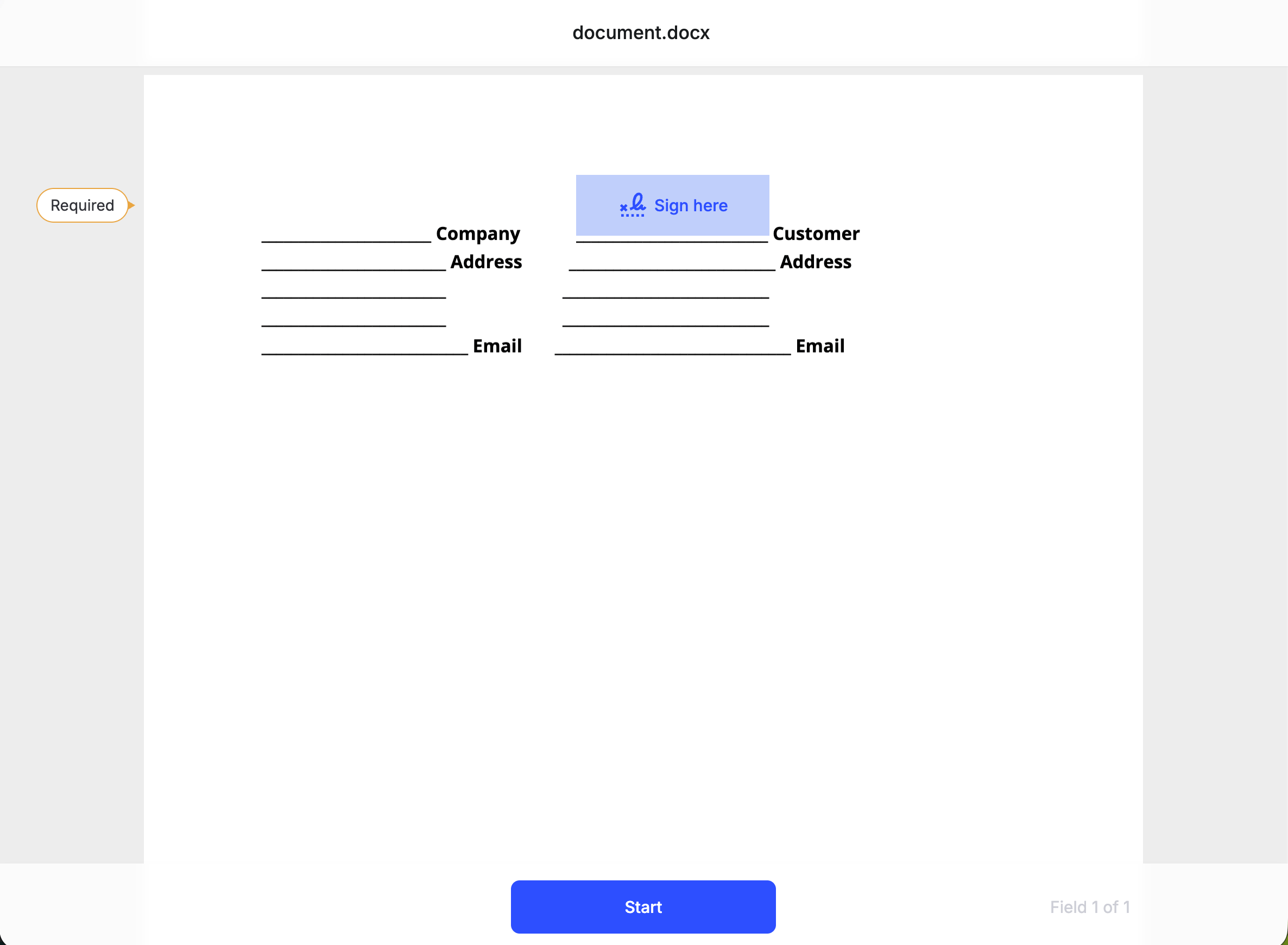
Signers open the link from their email and complete required fields on Formable.
Click **Start** to begin. Required fields are highlighted so the signer knows where to act.
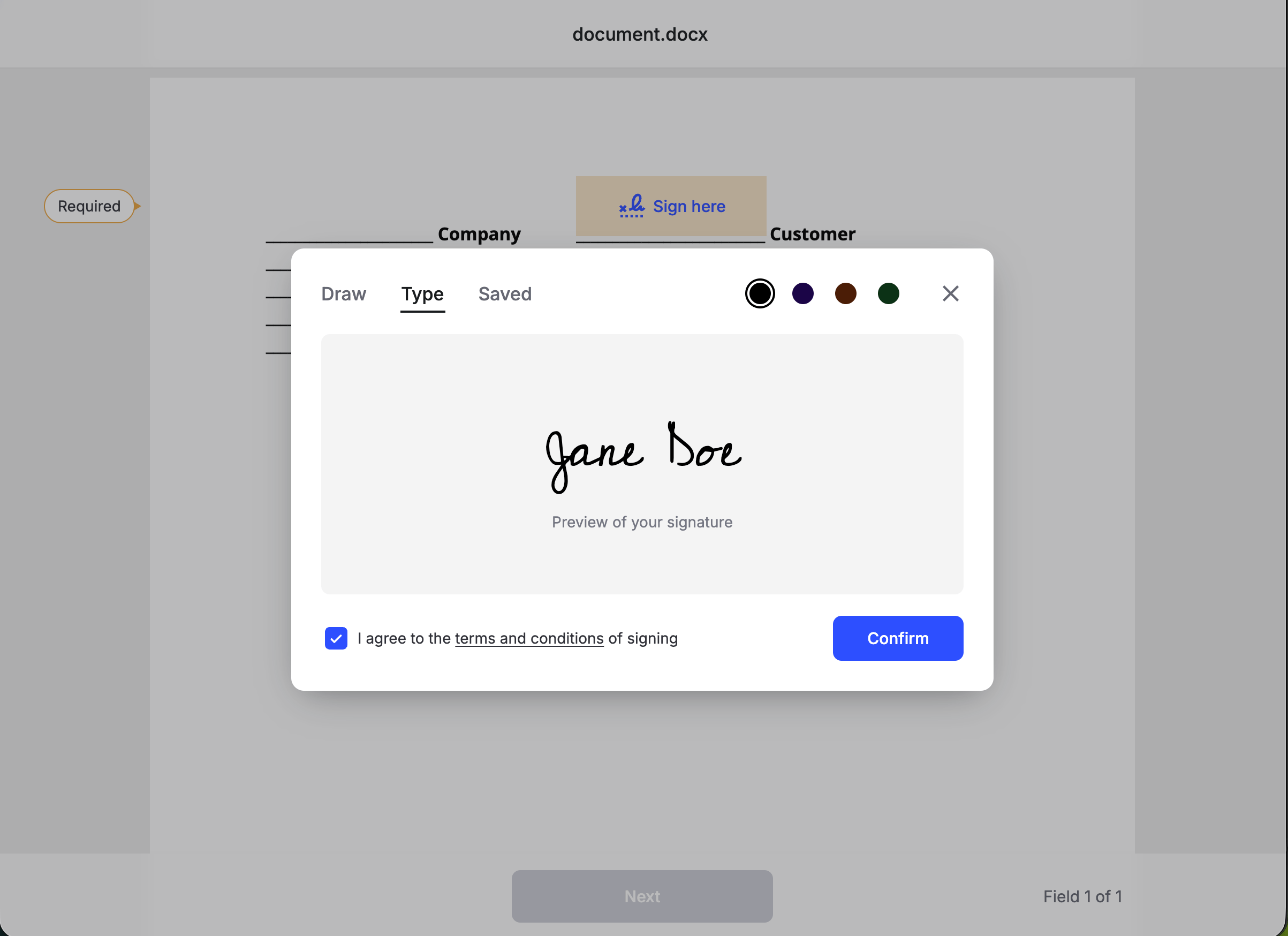
 When the signer reaches a Signature field, they can **Draw**, **Type**, or use a **Saved** signature. They must agree to the terms and conditions before confirming.
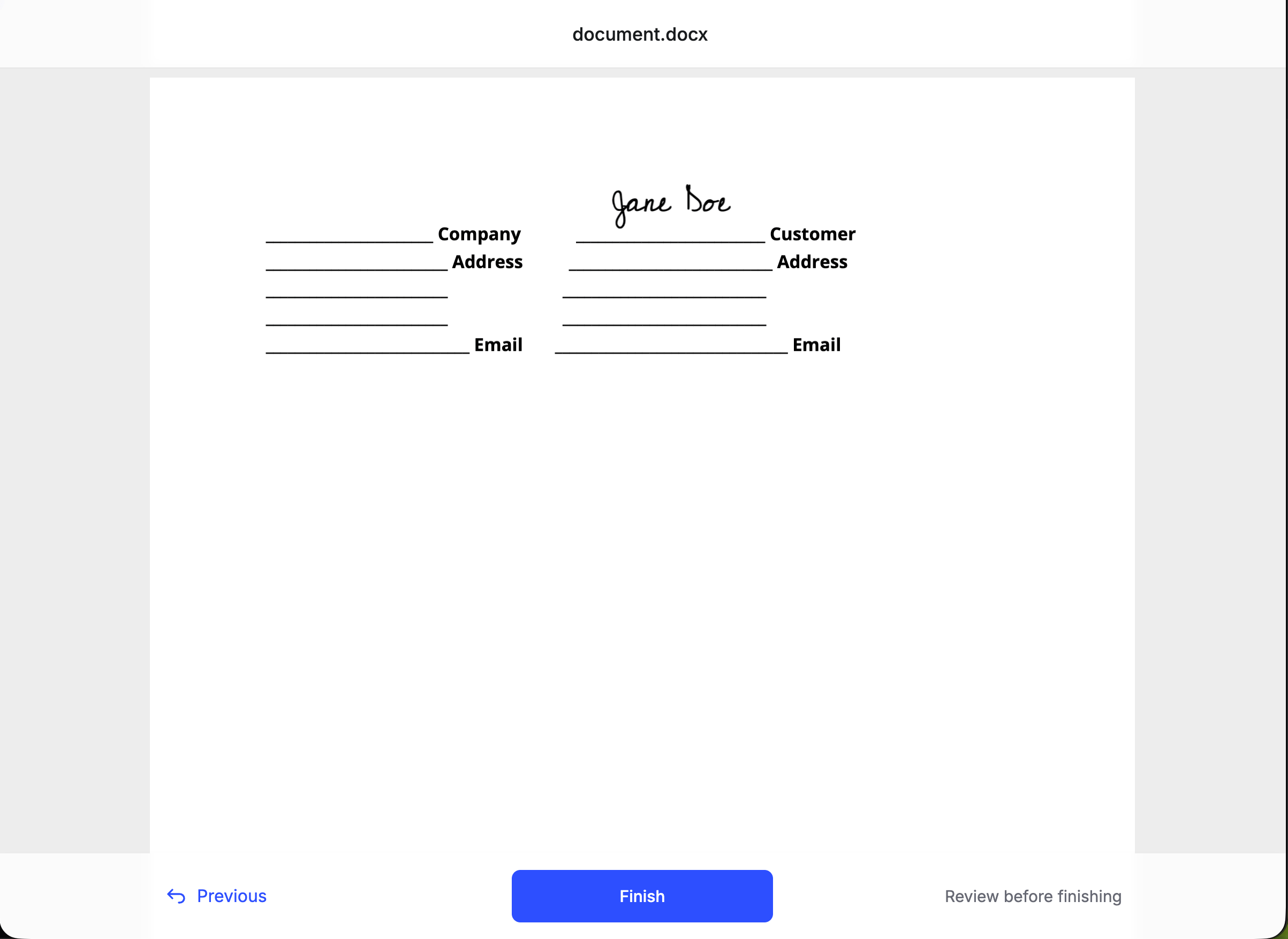
 After all required fields are complete, the signer reviews the document and clicks **Finish**.
 ## Detect completion
When signing finishes, the signature request `status` becomes `Completed`. You have three ways to learn that:
Configure a [webhook endpoint](/webhooks/overview) and handle the [`document_completed`](/webhooks/events#document_completed) event. Formable pushes this once the signed PDF is ready, so you can download without polling. Do not use [`document_signed`](/webhooks/events#document_signed) alone — that fires when a signer finishes, before the completed file is available.
```json theme={null}
{
"event": {
"event_type": "document_completed",
"event_category": "signing"
},
"signing": {
"signature_request_id": "sr_456def"
}
}
```
Fetch the [signature request](/api-reference/endpoint/get-signature-request) and check `status`. It moves from `Created` to `Completed`. The response also includes `signers` (with `recipientSignatureId`) and envelope `fields`.
```bash theme={null}
curl --request GET \
--url https://api.formabledocs.com/v1/signature-requests/sr_456def \
--header "Authorization: Bearer $TOKEN"
```
Fetch [signature request events](/api-reference/endpoint/get-signature-request-events) for a chronological history of what happened.
```bash theme={null}
curl --request GET \
--url https://api.formabledocs.com/v1/signature-requests/sr_456def/events \
--header "Authorization: Bearer $TOKEN"
```
Prefer the `document_completed` webhook as the source of truth before downloading. Use [List signature requests](/api-reference/endpoint/list-signature-requests) with `updatedSince`, or the event stream, to reconcile anything you missed.
## Download the signed PDF
Once status is `Completed`, fetch a temporary download URL for the signed PDF (the **signed envelope**).
```bash theme={null}
curl --request GET \
--url https://api.formabledocs.com/v1/signature-requests/sr_456def/signed-envelope \
--header "Authorization: Bearer $TOKEN"
```
```json Response theme={null}
{
"signedEnvelopePresignedUrl": "https://s3.amazonaws.com/bucket/signed-envelope.pdf?..."
}
```
Open or download that URL promptly — it is a short-lived presigned link.
Requesting the signed envelope before signing is complete returns `409` with `"Envelope has not been signed yet"`.
## Embedded vs non-embedded
| | Embedded | Non-embedded |
| -------- | ------------------------------------------------------------------------------------------ | ----------------------------------------------------------------------------------------- |
| Endpoint | [`POST /v1/signature-requests/embedded`](/api-reference/endpoint/create-signature-request) | [`POST /v1/signature-requests`](/api-reference/endpoint/create-regular-signature-request) |
| Delivery | You generate a [signing URL](/api-reference/endpoint/create-signing-url) and embed it | Formable emails each signer |
| UI | Iframe in your product | Formable hosted page from email link |
| Best for | In-app signing flows | Email-based signing outside your app |
## Next steps
Embed the signing experience in an iframe inside your product.
Map `send` / `send_with_template` to Formable.
Get notified when a document is viewed or signed.
Request and response schema for `POST /v1/signature-requests`.
## Detect completion
When signing finishes, the signature request `status` becomes `Completed`. You have three ways to learn that:
Configure a [webhook endpoint](/webhooks/overview) and handle the [`document_completed`](/webhooks/events#document_completed) event. Formable pushes this once the signed PDF is ready, so you can download without polling. Do not use [`document_signed`](/webhooks/events#document_signed) alone — that fires when a signer finishes, before the completed file is available.
```json theme={null}
{
"event": {
"event_type": "document_completed",
"event_category": "signing"
},
"signing": {
"signature_request_id": "sr_456def"
}
}
```
Fetch the [signature request](/api-reference/endpoint/get-signature-request) and check `status`. It moves from `Created` to `Completed`. The response also includes `signers` (with `recipientSignatureId`) and envelope `fields`.
```bash theme={null}
curl --request GET \
--url https://api.formabledocs.com/v1/signature-requests/sr_456def \
--header "Authorization: Bearer $TOKEN"
```
Fetch [signature request events](/api-reference/endpoint/get-signature-request-events) for a chronological history of what happened.
```bash theme={null}
curl --request GET \
--url https://api.formabledocs.com/v1/signature-requests/sr_456def/events \
--header "Authorization: Bearer $TOKEN"
```
Prefer the `document_completed` webhook as the source of truth before downloading. Use [List signature requests](/api-reference/endpoint/list-signature-requests) with `updatedSince`, or the event stream, to reconcile anything you missed.
## Download the signed PDF
Once status is `Completed`, fetch a temporary download URL for the signed PDF (the **signed envelope**).
```bash theme={null}
curl --request GET \
--url https://api.formabledocs.com/v1/signature-requests/sr_456def/signed-envelope \
--header "Authorization: Bearer $TOKEN"
```
```json Response theme={null}
{
"signedEnvelopePresignedUrl": "https://s3.amazonaws.com/bucket/signed-envelope.pdf?..."
}
```
Open or download that URL promptly — it is a short-lived presigned link.
Requesting the signed envelope before signing is complete returns `409` with `"Envelope has not been signed yet"`.
## Embedded vs non-embedded
| | Embedded | Non-embedded |
| -------- | ------------------------------------------------------------------------------------------ | ----------------------------------------------------------------------------------------- |
| Endpoint | [`POST /v1/signature-requests/embedded`](/api-reference/endpoint/create-signature-request) | [`POST /v1/signature-requests`](/api-reference/endpoint/create-regular-signature-request) |
| Delivery | You generate a [signing URL](/api-reference/endpoint/create-signing-url) and embed it | Formable emails each signer |
| UI | Iframe in your product | Formable hosted page from email link |
| Best for | In-app signing flows | Email-based signing outside your app |
## Next steps
Embed the signing experience in an iframe inside your product.
Map `send` / `send_with_template` to Formable.
Get notified when a document is viewed or signed.
Request and response schema for `POST /v1/signature-requests`.